Keyboard shortcuts are combinations of two or more keys (sometimes keystrokes + mouse click), which operated simultaneously execute a command that normally had to use mouse or access a menu. Keyboard shortcuts (keyboard shortcuts) were designed specifically to save timeBut they are very useful when we deal with a defective mouse. Key combinations can be used both in Windows and also in almost all programs installed on Windows (Adobe, Paint, Word, Calculator, Windows Explore, etc.…).
After almost two years, when Windows 7 it was still in phase beta, we present a list of a few keyboard shortcutsMost are combinations of key Win.
These days we found Microsoft.com o interesting list of shortcutsCEs (keyboard shortcuts) valid on operating systems Microsoft Windows 7.
- Ease of Access keyboard shortcuts in Windows 7
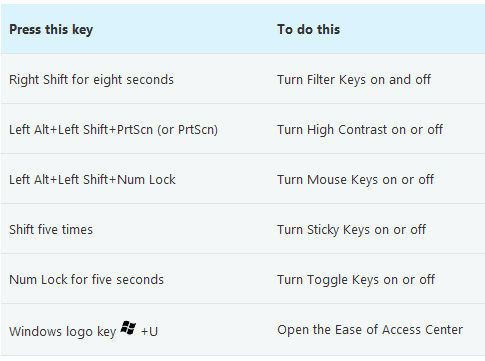
- General keyboard shortcuts in Windows 7

Complete list of keyboard shortcuts in Windows 7, Includes:
- Dialog box keyboard shortcuts in Windows 7
- Windows key logo keyboard shortcuts
- Windows Explore keyboard shortcuts
– Taskbar keyboard shortcuts
- Magnifier keyboard shortcuts
- Remote Desktop Connection keyboard shortcuts
- Paint keyboard shortcuts
- Wordpad keyboard shortcuts
- Calculator keyboard shortcuts
- Windows journal keyboard shortcuts
- Windows Help viewer keyboard shortcuts
Windows 7 Type – Keyboard Shortcuts in Windows 7.
