avp.exeIs the process that will sometimes headaches, because huge resources RAM si CPU consumed. One way is to be expected that this process sometimes skip limits. avp.exe is a process met all PCs installed Kaspersky Anti-Virus or Kaspersky Internet Security. The executable process avp.exe, CPC anti-virus launching virtually all protection modules. Protection against spyware, e-mail spam, trojans, viruses, malware and other threats coming from Internet or on deviceExternal sites. . .
Avp.exe errors si excessive consumption of resources may occur due to a very large number of files brought in a very short time in the Anti-Virus viewfinder, the setting "High”Of the security level for the modules, or… the request for Scanning the archives and installation packages.
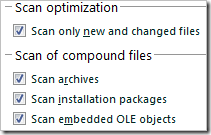
If you have checked all the boxes below "Scan of compound files", the chances are very high that AVP.EXE will consume your system resources (CPU & RAM) huge during the installation of some programs or while accessing a folder that contains many archives.
