most CMSSites, including WordPressHave the minimum requirement for installing to a newer version of PHP 5.1.x on web server. The tutorial below will show you some simple steps that can be upgrade the PHP version to PHP 5.1 5.3.x on Linux CentOS 5.6.
1. First you need to stop Apache web Server. (Httpd service)
service httpd stop2. Remove 5.1.x PHP packages installed on the server.
yum remove php php-*3. After you receive confirmation that PHP packages are deleted from the server, go to install packages PHP 5.3.
yum install php53.i386
yum install php53-bcmath.i386
yum install php53-cli.i386
yum install php53-common.i386
yum install php53-dba.i386
yum install php53-devel.i386
yum install php53-gd.i386
yum install php53-imap.i386
yum install php53-intl.i386
yum install php53-ldap.i386
yum install php53-mbstring.i386
yum install php53-mysql.i386
yum install php53-odbc.i386
yum install php53-pdo.i386
yum install php53-pgsql.i386
yum install php53-process.i386
yum install php53-pspell.i386
yum install php53-snmp.i386
yum install php53-soap.i386
yum install php53-xml.i386
yum install php53-xmlrpc.i386
Or even more simply, install all packages php53 *.
yum install php53*4. Start Apache Web Server
service httpd startPackages php53-pear, php53-mcrypt, php53-Mhash, php53-PDO, php53-pecl-apc si php53-pecl-memcache are not available for CentOS 5.6.
Finally check PHP5.3 version was installed successfully. Create a. Php (eg info.php.) That have:
<?php

phpinfo();

phpinfo(INFO_MODULES);

?>
Climb file servers and access to Firefox's address, Internet Explorer, Chrome or any other web browser. The result should be:

You can see which version of PHP is installed in the server and command line: php-v or with "yum list installed grep php”(Will show all installed PHP packages).
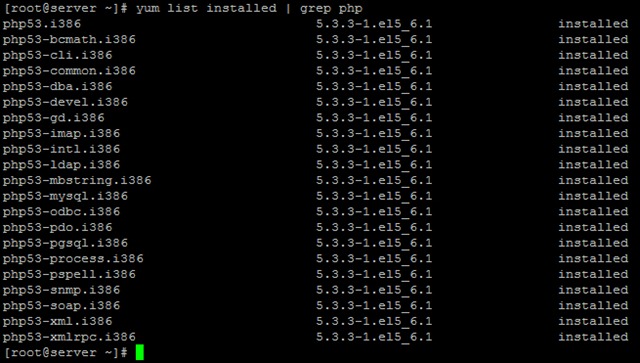
Stealth Settings - Upgrade / Install PHP 5.3 on CentOS 5.6.
