How do you turn off unnecessary system services [Windows 7]

Advertisements

are those small applications running in background each operating system, Most be responsible for the proper functioning and its applications / programs installed (Core Services). But some of these services are useless, Working "in blank" (or awaiting certain auxiliary componentss such as printers, faxes, routers etc.) and hence resource consuming nothing. Therefore we recommend Disabling these services to increase system performance Your

To disable a service (attention! If you are unfamiliar with system services good description of study to be sure that you will not disable services vital to system function operating) follow the steps below:

  • open Services (Type services.msc in Search software and files in Start Menu and give Enter)
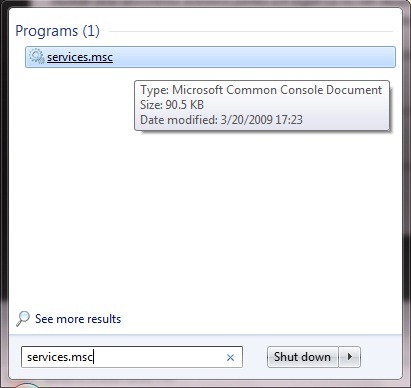
open_services

  • locate the service (or services) you want to disable and double-click it to open Properties
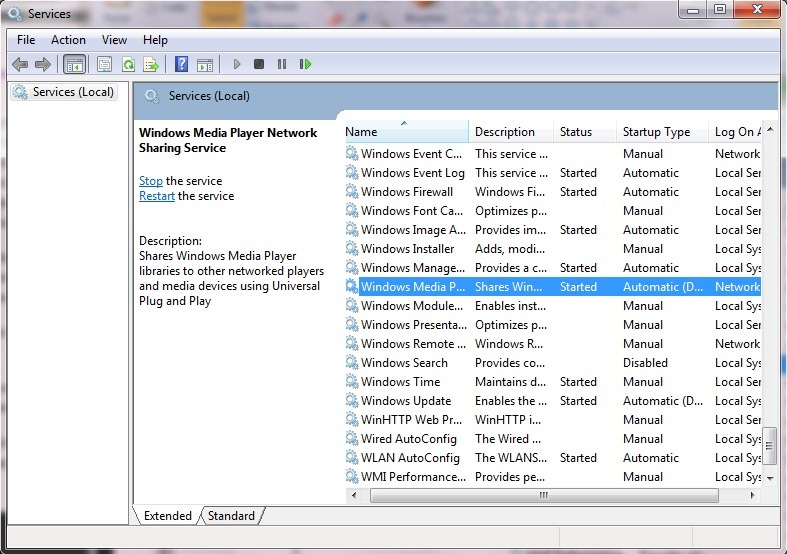
select_service

  • in tab General change the Startup type (Startup Type) For service in Disable then click on Apply si OK.
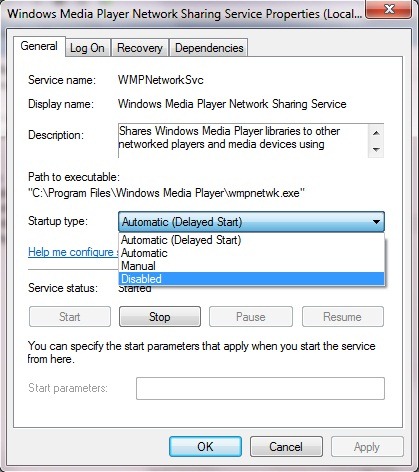
service_properties

Repeat for all the services that you want to disable (or if you want to reactivated service)

Pay attention to the services disabled to not wake up the system boot impossibility of afterwards!

Note: This tutorial was made on an operating system Ultimate.

Advertisements

PROGRAMS, IT tutorials and news by e-mail

SAVE TO FAVORITES / bookmarks

COMMENTS

3 Comments: How can disable unnecessary system services [Windows 7] #
  1. vicentiu says:

    I like to use Adobe Acrobat. and if we print spooler goes off to convert into pdf. and I ezactivat indexing file :)

  2. vicentiu says:

    most of the windows 7 services are set to manual. I do not see unnecessary services. can you tell if you disable firewall and antivirus integrated cup sharing if you do not need. do not even give you examples why. than that of the picture of Meia player. in xp but windows were more 7's not so

    • There are Windows 7, but depends on the individual to use and what not. We leave you to disable each attitude. We just showed how to disable a service user consider it useless, or service that requires a lot of resources and does not justify their use. There's no way to know what is a man who reads this article, and anyway is not a tutorial optimization. In addition to the services listed for you, I'm disabled and services related to printing (do not use printers, scanners) for dialing and even Indexing File (% CPU).

Comment?

Search on Google ::

vypnut ako process, desativar appeal inuteis not firefox?, najst ako nepotrebne subory Windows 7, configuracao do sistema Serviço win7, nepotrebne SLUZBY win xp, как отключить ненужные службы в windows 8, %windows 7 mysqld disabilitare servizio, %program care dezactiveaza servicii inutile windows, Windows 7 služby heats kter, Jaki was niepotrzebne Uslugi windows w 8, %win 8 zbytecne procesy, nepotrebne sluzby Windows 7, Syst, ktore systemové procesy vypnut vo win7, %quitar servicios innecesarios en windows 8,
ArabicBulgarianChinese (Simplified)Chinese (Traditional)CroatianCzechDanishDutchEnglishEstonianFinnishFrenchGermanGreekHebrewHungarianIndonesianItalianJapaneseKoreanLatvianLithuanianNorwegianPolishPortugueseRomanianRussianSerbianSlovakSlovenianSpanishTurkishUkrainian