In some older tutorials I show how to create and install Windows 7 si Windows XP The USB Stick (Memory Stick) - 1 tutorial - 2 tutorial - 3 tutorial.
ISO2USB It is a utility-like application WinToFlashOnly that it help us create USB drives botabile cu installation image operating systems CentOS / RedHat.
Before we get to create the USB stick installation image, we must have ISO installation image or DVD system installer. In addition, a USB stick greater 4GB. Preferably 8GB.
How to create bootable USB stick with CentOS / RedHat from ISO.
1. Download ISO2USB (Utility which make the stick bootable and help us copy the installation files ISO)

2. online and format USB server FAT32. (Merge and Quick Format).
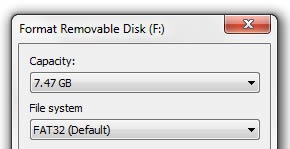
CAREFUL! During formatting all data on the memory stick will be deleted!
3. ISO2USB run the application. Select the ISO image installation and at “Drive”USB memory letter. If you have multiple USB sticks connected, go to "Computer" to make sure you start copying to the appropriate stick.
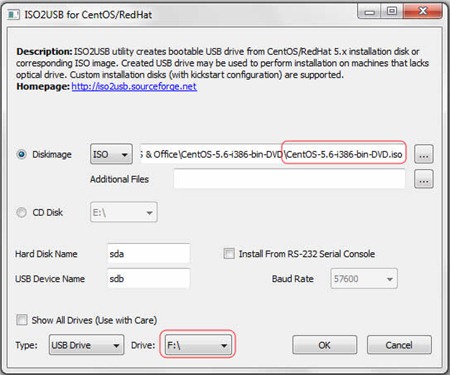
4. Click OK and wait until the copy and instalateaza bootloaderCPC USB memory.
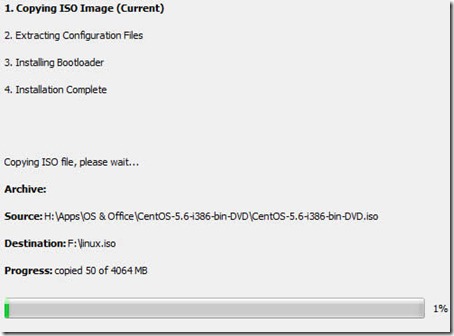
This process can take several minutes. Depending on the write speed of USB memory.
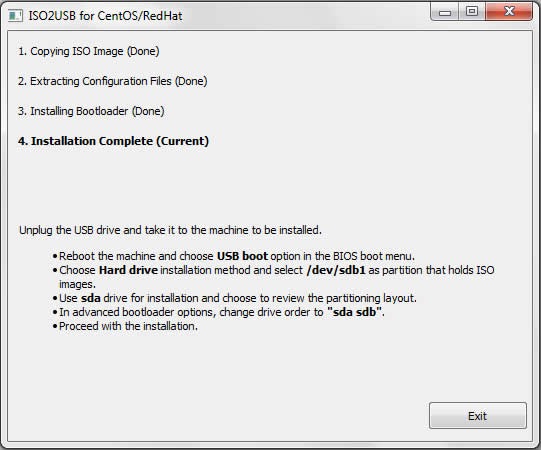
5. Finally read carefully installation instructions CentOS from the USB stick. Disconnect the stick and click "Exit".
If you are not careful with the installation and do not select the order of the partitions in "Advanced Bootloader"There is a good chance that GRUBCPC to be installed on USB stick.
ISO2USB utility creates bootable USB drive from CentOS/ RedHat 5.x installation disk or corresponding ISO image. Created USB drive may be used to perform installation on machines that lacks an optical drive. Custom installation disks (with kickstart configuration files) is fully supported. – project page.
Stealth Settings - CentOS / RedHat 5.x to USB - ISO2USB.
